
연구의 선진화와 생산성 향상에
필요한 최적의 소프트웨어와 컨설팅을
공급하도록 노력하겠습니다.
필요한 최적의 소프트웨어와 컨설팅을
공급하도록 노력하겠습니다.





Full Fortran 77, 90, and 95
Speed. Dependability. Great Tech Support. Lahey/Fujitsu Fortran 95.
The standard for Fortran programming from the leader in Fortran language systems.
Lahey combined our 40 years of producing award-winning Fortran language systems with Fujitsu's compiler expertise and high-performance code generator to deliver the most-productive, best-supported Fortran 95 language system for the PC. Whether you write new Fortran programs or downsize existing applications, you need speed, dependability, and great tech support. You need LF Fortran v7.3!
New release: LF95 v7.3 is available in two configurations: Express and Professional:LF95 Express includes the powerful Lahey/Fujitsu Fortran 95 optimizing compiler, linker, command line debugger, librarian, support for creating DLLs and calling the Windows APIs, online documentation, and free e-mail support. LF95 PRO adds Microsoft's Visual Studio 2010 Shell with Lahey's exclusive Fortran Integration, the Winteracter Starter Kit, WiSK, for creating Windows GUIs and displaying graphics, Polyhedron's Automake utility, Fujitsu's WinFDB Windows debugger, the Coverage Analysis Tool that detects unexecuted code and performs range-of-operation checking, the Sampler Tool (an execution profiler) that helps tune program performance, Fujitsu's Visual Analyzer, the Fujitsu SSL2 math library (an extensive library and a proven performer on Fujitsu mainframes and workstations) and the Fujitsu C compiler.

LF Fortran 95 Performance.
LF Fortran 95 7.3 offers improved execution performance on most Fortran 77 and 90 codes. The new optimizations help performance on Pentium(R) 4 and Xeon(TM) chips. "We tested v7.3 Win32 optimizations on a 2.4GHz P4 with 512 MB of PC2100 RAM, running Windows XP, using Polyhedron’s (www.polyhedron.com) Fortran benchmarks. Specifying the new switches -tp4, -sse2, -zfm, -o2, and -inline the 90 benchmarks ran an average of 15.4% faster and the 77 benchmarks 4.4% faster than they did when built with LF Fortran v7.0."
LF Fortran 95 Optimizations.
Basic Optimization
- Constant folding
- Common subexpression elimination
- Copy propagation
- Strength Reduction
- Algebraic simplifications
- Dead code elimination
- Peephole optimization
- Loop invariant code motion
- Transform array element to simple variable
- Local Instruction scheduling
- Address calculation optimization
- Array optimization
Program Reconstruction Optimizations
- Loop unrolling
- Loop interchange
Procedure Optimization
- Inlining mathematical functions
- Stack optimization
- Inline user-defined
Others
- Pentium/Pentium PRO/Pentium 4 instruction
- Using fast input/output libraries
- Prefetch Pentium III / Athlon
- SSE2 instruction optimizations
- Enable flush-to-zero mode for SSE2
Statically Link Fujitsu C and Borland C++ Object Files.
LF Fortran 95 supports static linking with Fujitsu C and Microsoft Visual C++ version 2.0 and greater. Combine your Fortran and C/C++ code into one executable. For the routines you don't want to develop yourself, you can also link with C/C++ routines from commercially available libraries.DLL Interfaces to Visual Basic, VC++, Borland C++, Delphi, Microsoft .NET languages.
Create 32-bit Windows DLLs from your Fortran routines and call the Fortran routines from 32-bit Windows programs created with Microsoft Visual Basic, Microsoft Visual C++, Borland C++, Borland Delphi, and Microsoft .NET languages.Win32 API Access.
LF Fortran 95 supports direct calls from Fortran to functions in the Win32 API. For a narrow range of applications, this might be the last little bit of glue you need to pull off your project. Note that this is not for the faint-hearted! You'll need to be a Windows programmer to get all but the most basic functionality. That's because the API was written to be called from C. And consequently, arguments need to be passed as C expects them. Structures and callback routines pose additional problems. Clearly, this would be a difficult way to build a Windows application from scratch.Legacy Fortran Support.
LF Fortran 95 extends its language support in other directions adding many legacy Fortran features, including VAX structures and the various UNIX service routines. These features further facilitate your move to cost/performance efficiency on the PC platform:- Unlimited number of continuation lines in free or fixed source form
- DO UNTIL statement
- FIND statement
- STRUCTURE and END STRUCTURE statements
- UNION and END UNION statements
- MAP and END MAP statements
- RECORD statement
- Non-standard POINTER statement
- AUTOMATIC statement
- STATIC statement
- VALUE statement
- BYTE statement
- Hollerith constants
- Alternative forms of binary, octal, and hexadecimal constants
- Binary, octal, or hexadecimal constants in a DATA, declaration statement
- Period structure component separator
- IMPLICIT UNDEFINED statement
- Namelist input/output on internal file
- FORM = 'BINARY'
- TOTALREC specifier
- STATUS = 'SHR'
- Gw, $, \, and R edit descriptors
- LOC intrinsic function
- The following service subroutines: ABORT, BEEP, BIC, BIS, CLOCK, CLOCKM, DATE, EXIT, ERRSAV, ERRSTR, ERRSET, ERRTRA, FDATE, FREE,GETARG, GETDAT, GETLOG, GETPARM, GETTIM, GMTIME, IBTOD, IDATE, IETOM, ITIME, IVALUE, LTIME, MTOIE, PERROR, PRNSET, QSORT, SETRCD, SETBIT, SIGNAL, SLEEP
- The following service functions: ACCESS, ALARM, BIT, CHDIR, CHMOD, CTIME, DRAND, DTIME, ETIME, FGETC, FPUTC, FSEEK, FSTAT, FTELL, GETC, GETCWD, GETFD, GETPID, HOSTNM, IARGC, IERRNO, INMAX, IOINIT, IRAND, JDATE, KILL, LNBLNK, LONG, LSTAT, MALLOC, NARGS, PUTC, RAN, RAND, RENAME, RINDEX, RTC, SECOND, SECNDS, SETDAT, SETTIM, SHORT, STAT, TIME, TIMEF, UNLINK
ANSI/ISO-Compliant Fortran 95.
LF Fortran 95 is a complete implementation of the ANSI/ISO Fortran 95 standard. Fortran 95 offers some small but important improvements over Fortran 90, including the ability to create your own elemental procedures, default initialization for structure components, the NULL intrinsic for initializing pointers, the FORALL construct, and a standard CPU_TIME intrinsic procedure.IEEE Standard 754 support
IEEE Standard 754 defines the representation and behavior of 32- and 64-bit floating point numbers. IEEE 754 support provides for consistency of basic computational results among platforms that use IEEE 754. An excellent overview of the standard is presented online by Steve Hollasch at http://research.microsoft.com/~hollasch/cgindex/coding/ieeefloat.html. A heavy-duty online discussion of floating point numbers and the standard is provided by David Goldberg at http://docs.sun.com/source/806-3568/index.html.
Visual Studio 2010 Shell with Lahey's exclusive Fortran Integration
Features
- Project system
- Win32 project templates
- On-line integrated help
- Syntax coloring
- Expandable code
- Method tips for intrinsic functions
- Quick info for local and global variables
- Block commenting and indenting
- Brace matching
- Block Reformatting
- Code Completion
- Code Snippets
- Collapsible Regions
- Find All References
- Go To Declaration
- Navigation Bars
- Smart Indenting
- Building Projects and Viewing Errors
- Integrated Debugger
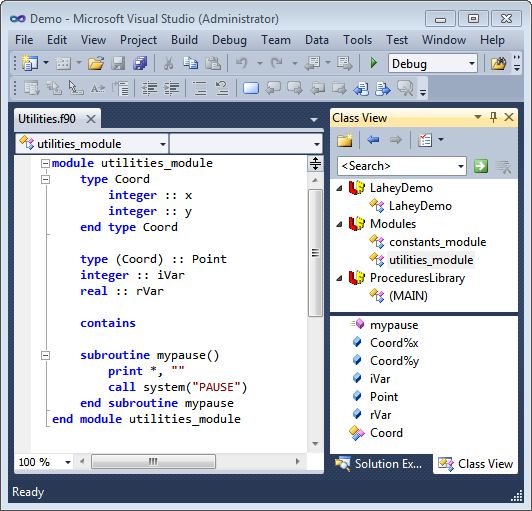
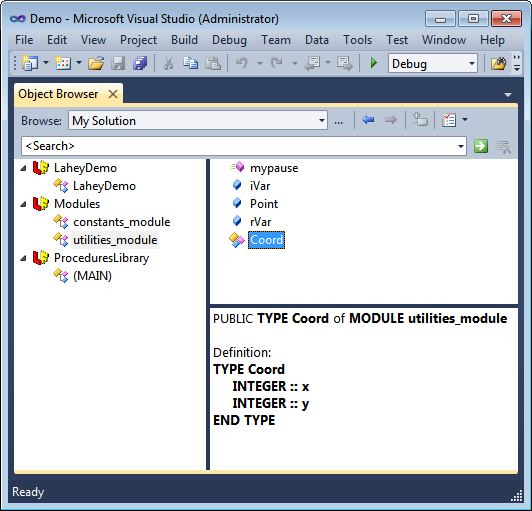
- Class View and Object Browser
- Automation support
- MSBuild support
- Visual SourceSafe support
Project system
The project is a basic building block that Visual Studio uses to create applications. A project will normally take a set of one or more source files and produce a compiled executable, but a project can also produce things like DLLs or static libraries, or do other sorts of processing. All the source files within a project are usually written in one programming language, and are compiled with one compiler. The LF95 integration package provides several type of projects, and allows users of previous versions of Visual Studio to automatically upgrade their native Fortran projects to VS 2010. The LF95 project facility automatically scans all source files at build time and ensures all files are built in the proper order to satisfy module dependencies.Win32 project templates
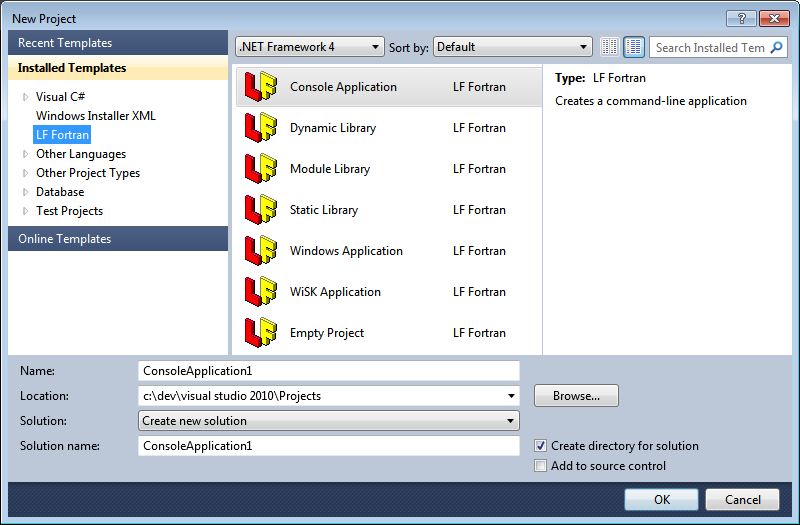
On-line integrated help
The VS2010 integration package provides documentation that is integrated into Visual Studio help system. The comprehensive documentation covers the Fortran language, LF95 compiler usage, and Fortran-smart Visual Studio editing features: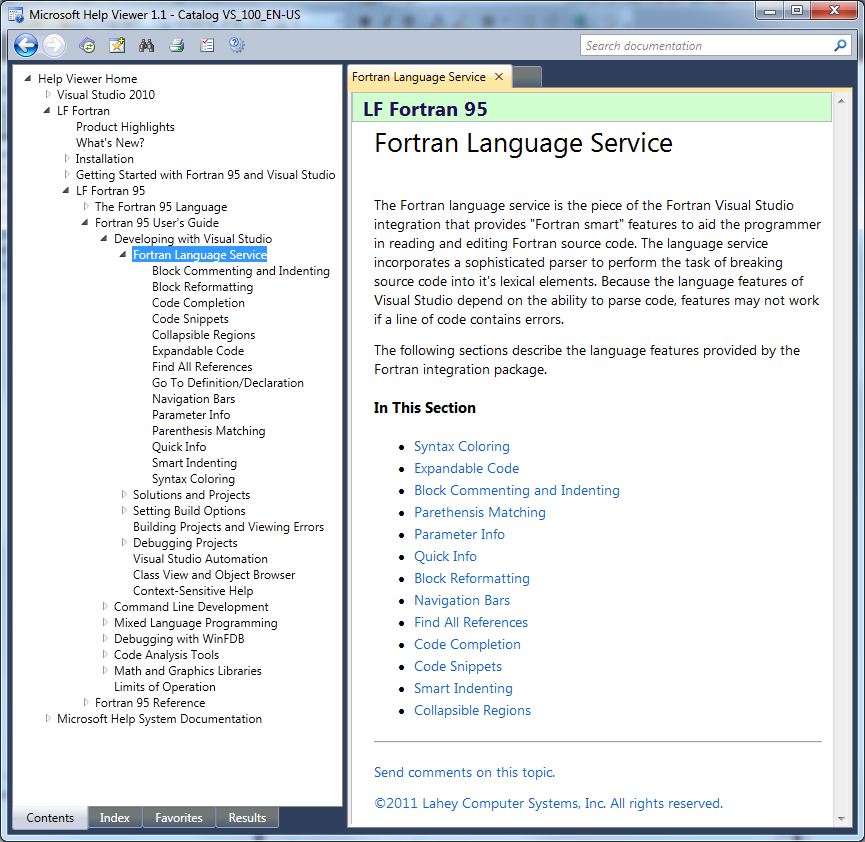
Syntax coloring
Syntax coloring provides the ability to differentiate code elements based on color. For example, a keyword may appear in blue, comments may appear in green, while character strings might be maroon. The Fortran language allows variables and procedures to have the same names as keywords, and this can pose a problem for colorizers that do not have a strong parsing ability. Since the parser used in the Lahey colorizer is derived from a Fortran compiler, it is unlikely that is would be confused by an identifier with the same name as a keyword. The integration package allows the user to customize the colorizing scheme.Expandable code
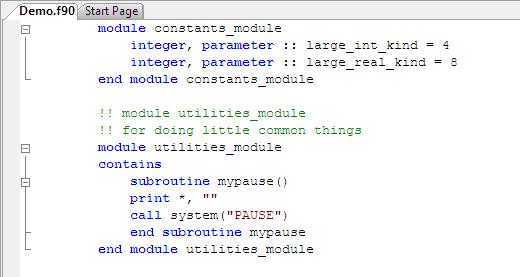
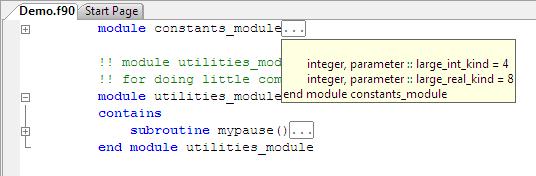
Method tips for intrinsic functions
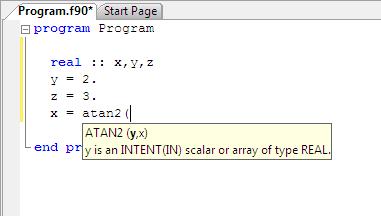
As a procedure invocation is typed, the open parenthesis character triggers the Parameter Info tooltip for the first argument:
As typing continues, each succeeding comma character that is typed will trigger a tooltip for the next parameter:
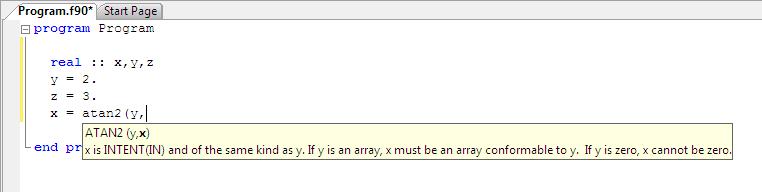 When a close parenthesis character is typed, the tooltip window is dismissed. The tooltip window is also dismissed whenever the cursor is moved outside of the area of the argument list.
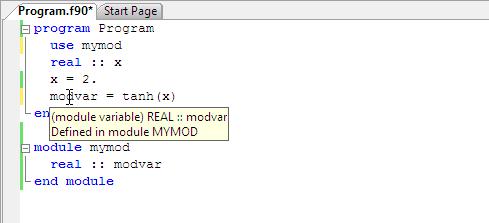
Quick info for local and global variables
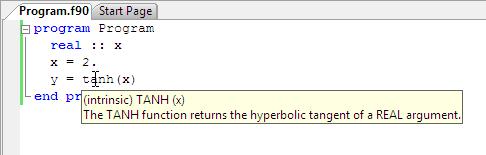
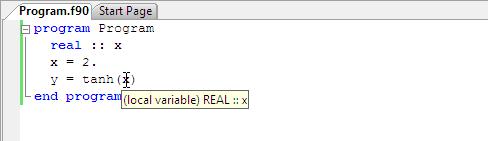
Block commenting and indenting
Block commenting is a feature that allows the user to quickly comment or uncomment selected blocks of code. Block indenting allows the user to change the indentation of a selected block of code. Both of these features work for code that is highlighted. If any portion of a line is highlighted, the feature works on the entire line. If there is no highlighted code, commenting or indenting will work on the single line where the cursor resides.Brace matching
Parenthesis matching is a feature that locates a matching parenthesis and highlights the parenthesis pair. This feature can be quite useful when examining a complex statement. The following diagram shows a single multiline code statement with the matching braces highlighted with a light gray box: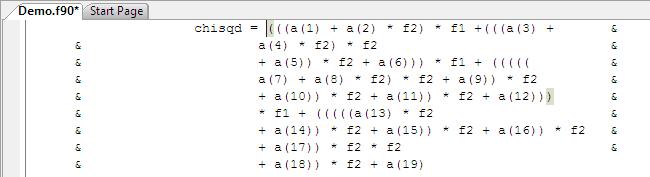
Block Reformatting
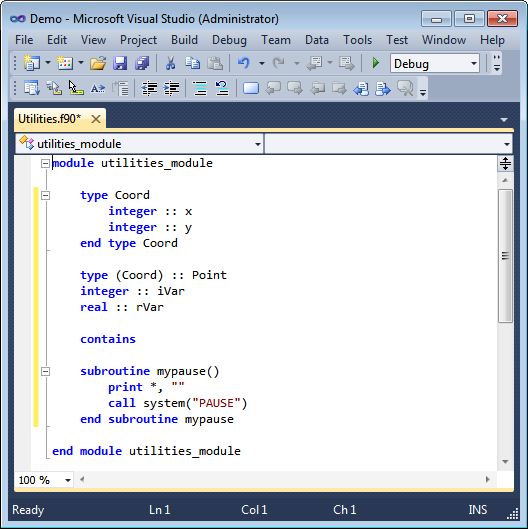
A section of code before reformatting:
img title="Lahey Fortran Visual Studio 2010 block reformatting" src="/lahey/image/F95VS2010LFReformatBefore.jpg" alt="Lahey Fortran Visual Studio 2010 block reformatting" width="528" height="529" />
And after:
Code Completion
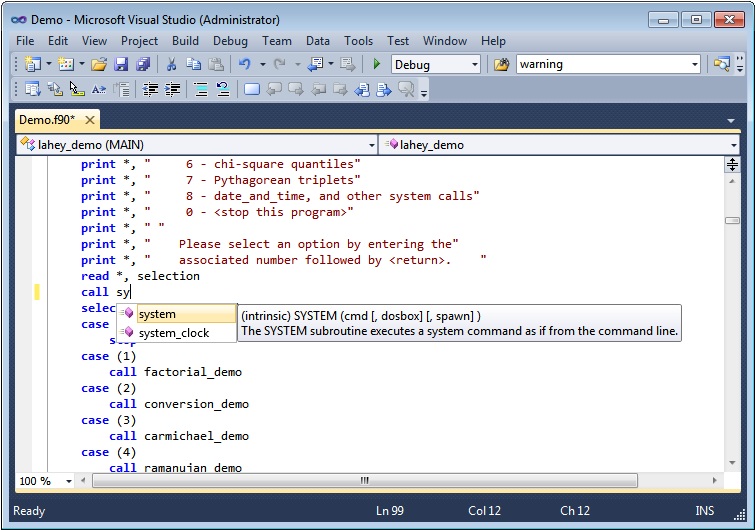
Code Completion is a source code editor feature that assists rapid development by offering an alphabetical list of possible keywords, names, and code snippets that might be entered as code is typed into the editor. The list display is triggered by typing an alphabetic character at the beginning of a line, after whitespace, or after any symbol.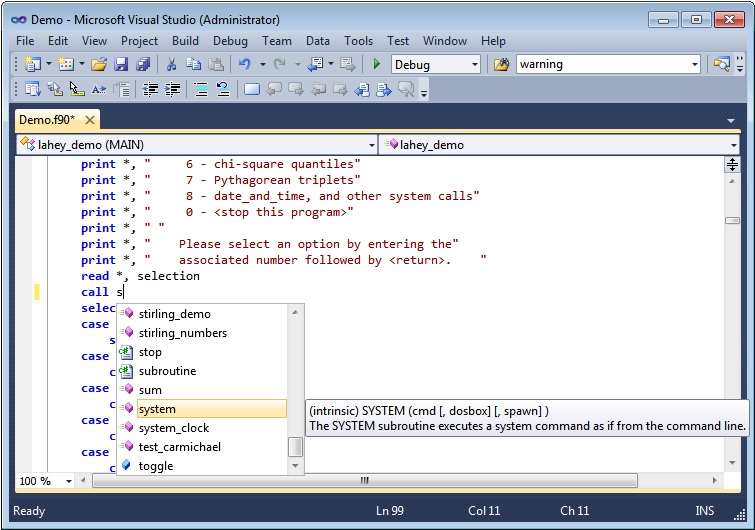
Code Snippets
Collapsible Regions
Find All References
Find All References is a feature that allows the user to display a list of all known references to a name within all of the source code in the Solution. It works in both the source code editor window, Class View and Object Browser. Right-click on a name in a Fortran code editor window to display a list of all known references to that name within the scope of the current cursor position. Right-clicking on anything other than a name will have no effect. Right-click on a item in the Member pane of Class View or Object Browser to display a list of all known references to that name within the Solution. The list will be displayed in the Find Symbol Results window. Double-click on a line in the list to open the source code file and jump to the position of that reference.Go To Declaration
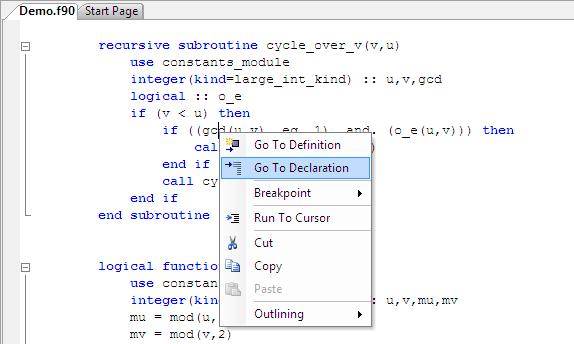
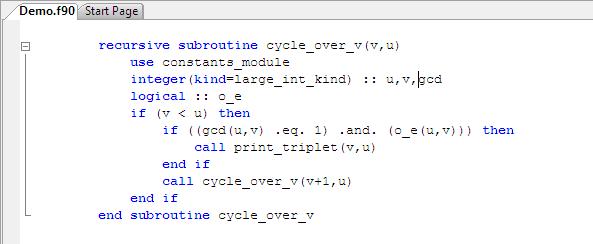
Navigation Bars
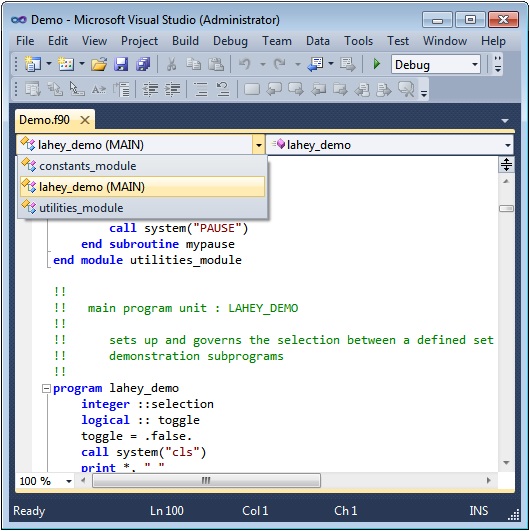
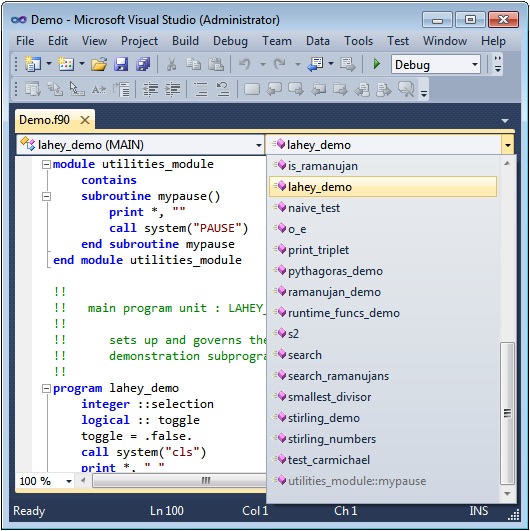
Smart Indenting
Smart Indenting is a free-format source code feature that allows the editor to indent the last line entered (terminated by the Enter key) as appropriate in relation to the previous line or the beginning statement of a code block. A code block consists of any statement that has a corresponding END statement.Building Projects and Viewing Errors
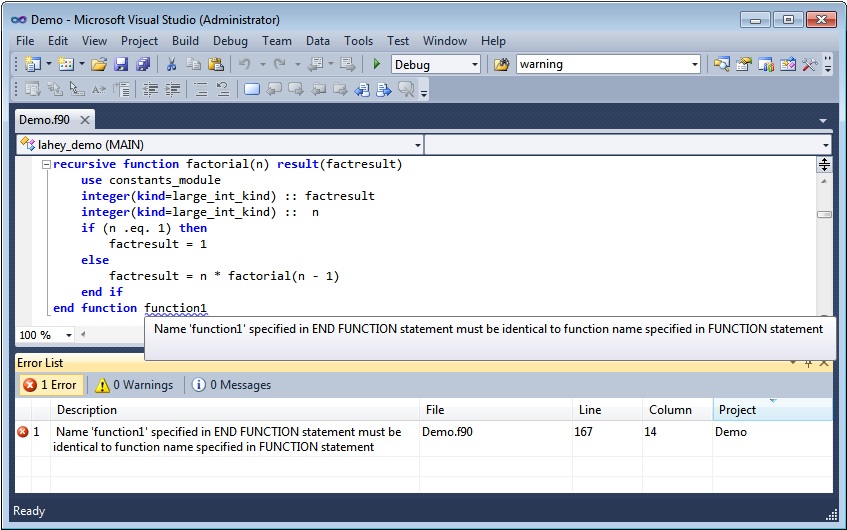
Debugger
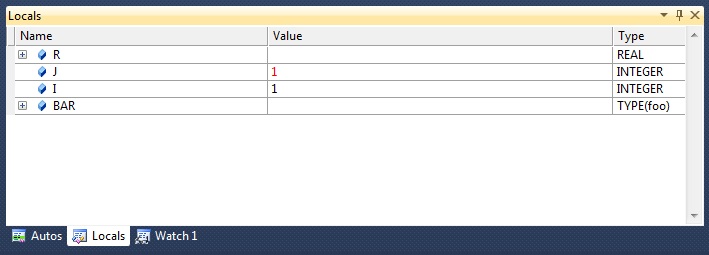
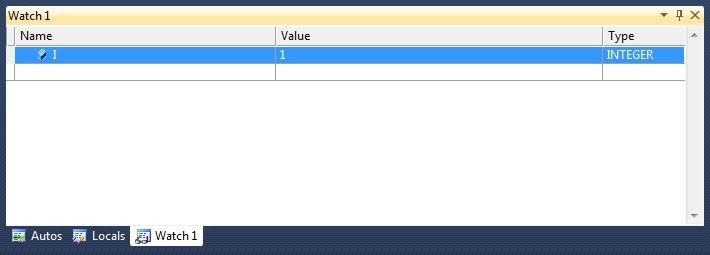
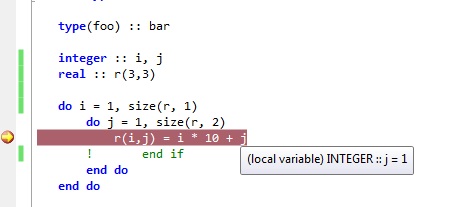
Beginning with Visual Studio 2010, Fortran programs are debugged using Visual Studio, which hosts the FDB command line debugger. The LF95 Fortran integration package uses Visual Studio debugging interfaces to host the FDB command line debugger. This allows you to debug your Fortran program using the Visual Studio Debug menu. While debugging, you can watch the values of variables change during program execution and set breakpoints with a mouse click. Using the VS debugging interface, you can run your program, set breakpoints, step a line at a time, view the values of variables in your program in several different ways, change the values of variables, and examine stack frames while running your program. The current executable line and any breakpoints are indicated with markers in the left margin of the source code display. If needed, the program will be rebuilt, the debugger will be started and the program will begin execution. When the program breaks execution, the execution pointer is displayed at the corresponding location in source code.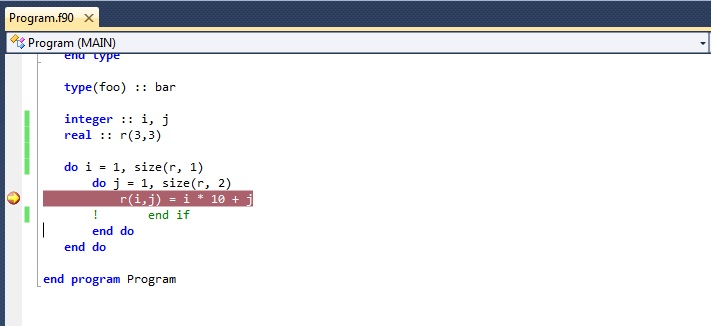
Class View and Object Browser
Automation support
Automation is the ability to control Visual Studio, solutions and projects with software. It allows the user to programmatically control project creation and modification, to set project and file compilation options, and to build and execute projects.MSBuild support
MSBuild is Microsoft's XML-based build system. It is integrated with Visual Studio, but it can also be used on the command line. The LF95 Project facility uses MSbuild when building projects. For a comprehensive description of MSBuild, see the MSDN documentation for msbuild.exe.Visual SourceSafe support
The Fortran integration package supports the Visual SourceSafe VCS. From Visual Studio 2008, the user with Visual SourceSafe installed will be able to easily place entire Fortran solutions under version control. The user can check Fortran files and projects in and out with Visual Studio. Note that because the Fortran project system modifies the project file in order to update dependency information, it is necessary to check out the project file before building the project.Fortran-Smart Windows Debugger
The WinFDB debugger provides a Windows graphical interface for debugging your Fortran code.Incrementally execute your program - Single step through your program. Step into or over calls to other routines.
Stop on Break Points - Click in the margin of your source code to set break points.
Examine Registers - Open the registers window to examine processor registers and flags.
Visual Step - Visual Step mode allows the user to automatically step through the program at a comprehensible pace.
Watch Variables - Open a watch window to show selected variable values in any active program unit.
Mixed-Language Programs - Debug programs created from LF Fortran 95 and Fujitsu C objects.
Other Development Tools
Complementing the Windows Development Environment, LF Fortran 95 includes the Microsoft's make utility (nmake), Automake make utility; Microsoft's library manager (lib) and Lahey's Library Manager (LM) for building and working with library files; and Microsoft's linker (link).Winteracter Starter Kit.
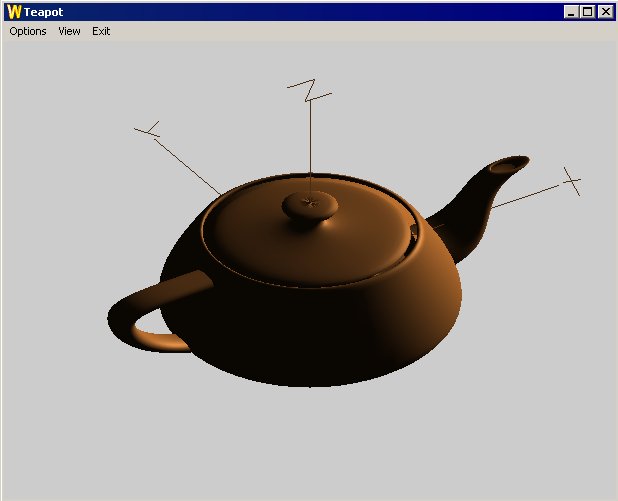
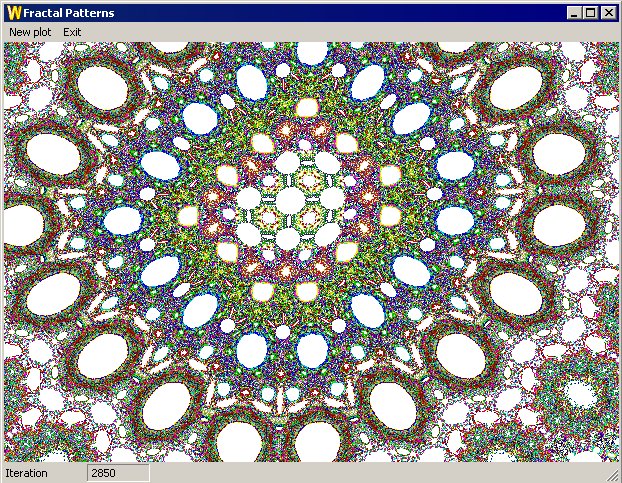
Use the Winteracter Starter Kit - WiSK - for creating true Windows programs with Fortran. WiSK is a subset of the Winteracter Library created by Interactive Software Services, Ltd. (Winteracter is available from Lahey.) Winteracter is a Fortran 95-callable, 32-bit, Windows, user-interface and graphics development kit. Derived from Winteracter, WiSK provides a library of subroutines for window management, input handling, dialog management, and high resolution graphics, plus custom versions of the visual menu and dialog designers.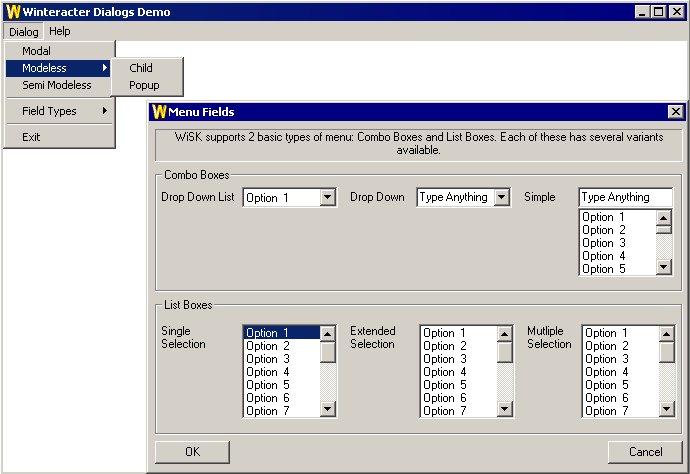
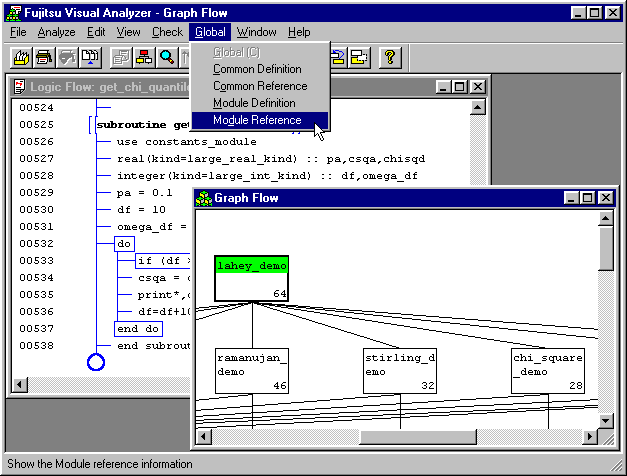
LF Fortran 95 beta tester Barry Santana says, "Fujitsu Visual Analyzer has been a great help in avoiding conflicts in the modifications. The help that Lahey Technical Support has provided quickly and without hassle has provided this project with a much needed shot in the arm! It has confirmed that my decision to switch to the Lahey compiler was correct. Thanks for all the help."
The Fujitsu Scientific Library 2.
The Fujitsu Scientific Subroutine Library 2 (SSL2) has been in use for years in Japan on Fujitsu mainframe and workstation hardware. SSL2 offers over 250 optimized routines in the following areas:Linear Algebra
- Matrix Storage Mode Conversion
- Matrix Manipulation
- Linear Equations and Matrix Inversion (Direct Method)
- Least Squares Solution
Eigenvalues and Eigenvectors
- Eigenvalues and Eigenvectors of a Real Matrix
- Eigenvalues and Eigenvectors of a Complex Matrix
- Eigenvalues and Eigenvectors of a Real Symmetric Matrix
- Eigenvalues and Eigenvectors of a Hermitian Matrix
- Eigenvalues and Eigenvectors of a Real Symmetric Band Matrix
- Eigenvalues and Eigenvectors of a Real Symmetric Generalized Eigenproblem
- Eigenvalues and Eigenvectors of a Real Symmetric Band Generalized Eigenproblem
Nonlinear Equations
- Polynomial Equations
- Transcendental Equations
- Nonlinear Simultaneous Equations
Extrema
- Minimization of Function with a Variable
- Unconstrained Minimization of Multivariable Function
- Unconstrained Minimization of Sum of Squares of Functions (Nonlinear Least Squares Solution)
- Linear Programming
- Nonlinear Programming (Constrained Minimization of Multivariable Function)
Interpolation and Approximation
- Interpolation
- Approximation
- Smoothing
- Series
Transforms
- Discrete Real Fourier Transforms
- Discrete Cosine Transforms
- Discrete Sine Transforms
- Discrete Complex Fourier Transforms
- Laplace Transform
Numerical Differentiation and Quadrature
Differential Equations
Special Functions
- Elliptic Integrals
- Exponential Integral
- Sine and Cosine Integrals
- Fresnel Integrals
- Gamma Functions
- Error Functions
- Bessel Functions
- Normal Distribution Functions
Pseudo Random Numbers
- Pseudo Random Generation
- Pseudo Random Testing
Free Email Support.
- Free e-mail, fax, and postal mail technical support available with LF Fortran 95.
LF Fortran 95 Specifications
Compiler Switches
- -[n]ap
- Guarantee consistency of REAL and COMPLEX calculations
- -[n]blas
- Link with optimized BLAS library
- -block <value>
- Set default block size for OPEN statements
- -[n]c
- Create object and/or module files without an executable
- -[n]chk [<args>]
- Check substrings and array subscripts, non-common variables accessed before initialization, and mismatched procedure arguments
- -[n]chkglobal
- Generate compiler error messages, and perform full compile and runtime checking
- -[n]co
- Display compiler options
- -[n]concc
- Support carriage control characters in console I/O
- -[n]cover
- Generate information for use by the coverage tool
- -[n]dal
- Deallocate allocatable arrays
- -[n]dbl
- Extend REAL and COMPLEX variables, arrays, constants, and functions to KIND=8
- -[n]dll
- Generate a dynamic link library
- -[n]f95
- Generate warnings for non-standard Fortran 95
- -file <name>
- Ensure driver interprets file name as name of file and not a switch argument
- -[n]fix
- Interpret source files as Fortran 95 fixed source form
- -[n]g
- Generate debugger information
- -i <path>
- Specify search path for Fortran INCLUDE files
- -[n]in
- Equivalent to including an IMPLICIT NONE statement in each program unit
- -[n]info
- Display informational messages at compile time
- -[n]inline [<value>]
- Inline user-defined procedures
- -[n]lapack
- Link with optimized LAPACK library
- -[n]li
- Avoid recognizing non-standard Lahey intrinsic procedures
- -[n]long
- Extend all default INTEGER variables, arrays, constants, and functions to KIND=8
- -[n]lst [<args>]
- Create source listings
- -[n]maxfatals <value>
- Specify maximum number of fatal errors allowed before stopping compilation
- -ml <arg>
- Generate code compatible with other languages
- -mldefault <arg>
- Specify default mixed language target
- -mod <path>
- Specify search path for module files
- -o <name>
- Override default object file name
- -o0
- Optimization level 0 - perform no optimization
- -o1
- Optimization level 1 - perform full optimization
- -o2
- -o1 plus loop and array optimizations
- -out
- Specify output file name
- -[n]pause
- Create pause after program completion
- -[n]pca
- Prevent invoked subprograms from storing into constants
- -[n]prefetch <value>
- Generate prefetch optimizations
- -[n]private
- Set default block size for OPEN statements
- -[n]quad
- Extend all double-precision REAL and COMPLEX variables, arrays, rays, constants, and functions to KIND=16
- -[n]sav
- Allocate local variables in a compiler-generated SAVE area
- -[n]ssl2
- Link with optimized SSL II library
- -[n]sse2
- Optimize using SSE2 instructions
- -[n]staticlib
- Static or dynamic linkinf of Fortran runtime libraries
- -[n]staticlink
- Statically link with code produced by another supported language system
- -[n]stchk
- Check for stack overflows
- -[n]swm <args>
- Suppress warning messages
- -t4
- Generate code optimized for Intel 80386 or 80486 processor
- -tpp
- Generate code optimized for Intel Pentium Pro, Pentium II, Pentium III, or Celeron processors, or generic counterparts
- -tp4
- Generate code optimized for Intel Pentium 4, Xeon, or generic counterparts
- -[n]trace
- Include procedure traceback and line numbers in runtime error messages
- -[n]trap <args>
- Trap numeric data processor (NDP) exceptions at runtime
- -[n]unroll [<value>]
- Control loop unrolling
- -[n]varheap [<value>]
- Allocate local variables on heap
- -version
- Display version and owner information only
- -[n]vsw
- Create a simple console-like Windows GUI application
- -[n]w
- Generate warning messages
- -wide
- Wide fixed form line length
- -win
- Create Windows application
- -winconsole
- Create Windows Console application
- -[n]wisk
- Create application that uses the Winteracter Starter Kit (WiSK)
- -[n]wo
- Generate warning messages for obsolescent Fortran 90 code
- -[n]xref [<args>]
- Create cross-reference listings
- -[n]zero
- Include variables initialized to zero
- -[n]zfm
- Enable flush-to-zero mode for SSE2 instructions
LF Fortan 95 System Requirements
With Visual Studio
Hardware
- A Pentium series or compatible processor
- 1.6 GHz or higher CPU, 1 GB or more RAM, 1024x768 display (Recommended Minimum)
Operating System
- Windows 7
- Windows Vista
- Windows Server 2008
- Windows XP Service Pack 2 (SP2) or later
- Windows Server 2003 w/SP1
Command-line Only
- An 80486DX, Pentium series or compatible processor
- Microsoft Windows 7, Vista, XP, 2000, NT 4.0, Me, 98, or 95
- 32 MB of RAM
- 35 to 65 MB of available hard disk space on the installation drive, depending on the sub-features selected

