The real-time GPS interface toolkit for Windows developers! These libraries are behind our popular Geographic Tracker that ships in every copy of MapInfo Professional. They will enable your application to communicate with GeoTrack via a DLL. Embed GPS properties in your application today!
GeoTrack allows your Windows application to interact with a GPS receiver through a standard serial or USB port. You can retrieve information directly from the GPS. You can process position, time, speed, heading, satellite positions, satellite signal strength, and dilution of precision information. GeoTrack currently supports Motorola Binary, NMEA 0183 2.0, Trimble TSIP, and Trimble TAIP protocols.
GeoTrack is available as a dynamic link library (DLL).
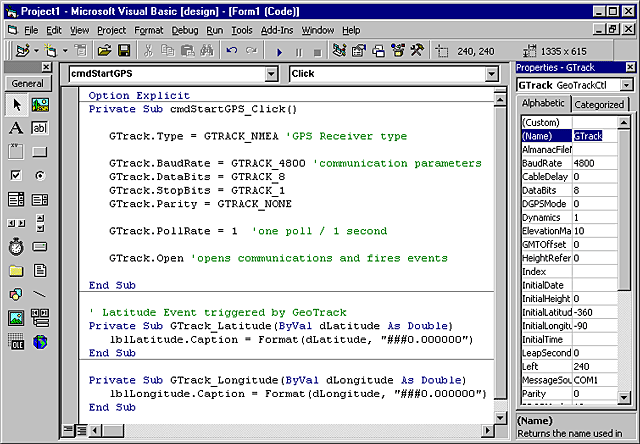
Easy to use GPS integration!
We have been using GeoTrack under the hood of the Geographic Tracker for years. Now you can add real-time GPS data into your app.
GeoTrack
Features
An application communicates with GeoTrack via a DLL, included with a GeoTrack developer's license. Many development tools for Microsoft Windows can make use of GeoTrack, including Visual Basic, Visual C++, Delphi, and others.
How does GeoTrack work?
GeoTrack DLL
Open communications with the GPS receiver.
Poll the GPS receiver for messages.
Process position, time, speed, heading, satellite positions, satellite signal strength, and dilution of precision information in GeoTrack defined callback functions.
Retrieve precise timing information. The precise one pulse per second (1PPS) timing pulse of Motorola Oncore receivers is used for various time synchronization and frequency control applications. (Motorola only)
Easy to use GPS integration!
Use as much or as little of the GPS information as you need for your application. You're in control!
GeoTrack
Details
GPS Receiver Support
NMEA 0183
Trimble TSIP
Trimble TAIP
Motorola Binary
NMEA 0183 Sentence Support
GGA - GPS fix data
GLL - geographic position
GSA - DOP and active satellites
GSV - satellites in view
RMA - recommended minimum specific Loran-C data
RMC - recommended minimum specific GPS/Transit data
STN - multiple data ID
VTG - track made good and ground speed
ZDA - time and date
DPT - depth
DBT - depth below transducer
Trimble TSIP Sentence Support
0x41 - GPS time
0x42 - single precision XYZ
0x43 - velocity, XYZ
0x44 - satellite selection
0x45 - software version
0x46 - health
0x47 - signal levels
0x4A - single precision latitude/longitude/altitude
DLL Functions
Not all functions are supported by all GPS receivers.
GeoTrack_Close
GeoTrack_GetDefaultCommInfo
GeoTrack_Open
GeoTrack_Poll
GeoTrack_RecordASCIIPositionData
GeoTrack_RecordBinaryData
GeoTrack_RecordPositionData
GeoTrack_RecordTimingData
GeoTrack_Request
GeoTrack_Set1PPSCableDelay
GeoTrack_SetAlmanacDataInput
GeoTrack_SetAlmanacDataOutput
GeoTrack_SetASCIIPositionDataRate
GeoTrack_SetCallback_1PPSCableDelay
GeoTrack_SetCallback_AlmanacDataInput
GeoTrack_SetCallback_AlmanacDataOutput
GeoTrack_SetCallback_ASCIIPositionData
GeoTrack_SetCallback_Date
GeoTrack_SetCallback_Depth
GeoTrack_SetCallback_DOP
GeoTrack_SetCallback_FixStatus
GeoTrack_SetCallback_GMTOffset
GeoTrack_SetCallback_GPSInfo
GeoTrack_SetCallback_Heading
GeoTrack_SetCallback_Height
GeoTrack_SetCallback_HeightGGA
GeoTrack_SetCallback_Latitude
GeoTrack_SetCallback_LeapSecondPending
GeoTrack_SetCallback_Longitude
GeoTrack_SetCallback_MagVariation
GeoTrack_SetCallback_NumSats
GeoTrack_SetCallback_PositionHoldMode
GeoTrack_SetCallback_PositionHoldPosition
GeoTrack_SetCallback_PositionStatusData
GeoTrack_SetCallback_PowerOnFailure
GeoTrack_SetCallback_ReceiverID
GeoTrack_SetCallback_SatsInView
GeoTrack_SetCallback_SatsUsed
GeoTrack_SetCallback_SelfTest
GeoTrack_SetCallback_SetToDefaults
GeoTrack_SetCallback_Speed
GeoTrack_SetCallback_TalkerID
GeoTrack_SetCallback_TimeMode
GeoTrack_SetCallback_TimeOfDay
GeoTrack_SetCallback_TimeRAIMSetupAndStatus
GeoTrack_SetDate
GeoTrack_SetGMTOffset
GeoTrack_SetHeight
GeoTrack_SetLatitude
GeoTrack_SetLongitude
GeoTrack_SetNMEASettings
GeoTrack_SetOutputMessageFormat
GeoTrack_SetPlaybackMode
GeoTrack_SetPositionHoldMode
GeoTrack_SetPositionHoldPosition
GeoTrack_SetPositionStatusDataRate
GeoTrack_SetTimeMode
GeoTrack_SetTimeOfDay
GeoTrack_SetTimeRAIMSetupAndStatus
GeoTrack_SetTSIPSettings
GeoTrack_StopRecordingASCIIPositionData
GeoTrack_StopRecordingBinaryData
GeoTrack_StopRecordingPositionData
GeoTrack_StopRecordingTimingData
GeoTrack
Who's Using GeoTrack
We have over 120,000 customers around the world, here are just a few:
Nasa
Ericcson
Lucent
The FAA
The National Park Service
Chevron - Texaco
Boeing
Shell
Exxon-Mobil
Thales Geosolutions
Oracle
British Geological Survey
BP Amoco
Harvard University
Yale School of Architecture
Yale University
Princeton University
Domino's Pizza
User Comments
"We had GeoTrack receiving and displaying location data from a hand-held GPS in under 20 minutes. If you're looking to develop robust GPS applications in a timely manner, this is the way to do it."
R. Martinson -LimeLyte
"I really liked the functionality and ease at which I could view satellite positions and signal strengths within my application."
M. Stocks
"Tracking my employees' positions in the field allowed us to analyze production slow-downs and inefficiencies within our organization."
Q: How does GeoTrack work? What is the sequence of events? A: Once you have opened communication between the GPS receiver and your application, GeoTrack will read the serial port, parse the GPS data, and send data to your application as events (OCX) or callbacks (DLL). Events or callbacks are fired in your application. You retrieve GPS information in these events or callbacks. You can implement whatever code you want in these event or callback procedures.
Q: What are NMEA settings files? A: Many types of NMEA 0183 compliant GPS receivers can be custom configured if the
user adjusts them with new configuration information. Typically, this
adjustment is made to the unit via a text string, defined by the receiver
manufacturer, that tells the unit what location information to transmit. To configure your NMEA 0183 compliant GPS receiver you should create a NMEA settings file containing configuration strings to be sent to the GPS receiver. NMEA settings files are simple ASCII text files that can be created with any text file editor.
Using GeoTrack DLL you call GeoTrack_SetNMEASettings function to specify the filename of your settings file. The GeoTrack_SetNMEASettings will upload the settings file to your receiver. An example of a NMEA settings file is "PASH.NSF" which configures the Ashtech Super CA receiver:
For more information on NMEA commands please consult your receiver's "User's Guide" and the NMEA 0183 Standards. ( A copy of the NMEA standards can be purchased from the
National Marine Electronics Association.
Q: I understand that GeoTrack can interact directly with a GPS device, but could it interact with a RADIO MODEM that carries the GPS data? A: GeoTrack "opens" the serial port and places GPS data into a buffer as it is received. The buffer is searched for "known" command packets in the GPS message. After a command packet is found and processed the GeoTrack DLL fires a callback function with pertinent information, for example, latitude and longitude as double values in decimal degrees. The GeoTrack OCX fires an appropriate event.
Q: What does NMEA and NMEA 0183 mean? A: NMEA, the National Marine Electronics Association, has established a standard (NMEA 0183) that defines how various electronic devices communicate, including GPS receivers. A copy of the NMEA 0183 standard can be purchased from the
National Marine Electronics Association.
Q: Where is the OCX version of GeoTrack? A: The installation for GeoTrack installs the DLL version of GeoTrack (bmgtrk32.dll) and the OCX version (GeoTrack.dll) into your C:\WINNT\System32\ directory.






 Easy to use GPS integration!

